Source: https://maps.vietmap.vn/docs/sdk-mobile/sdk-ios/navigation/
# SDK iOS Version 2.0
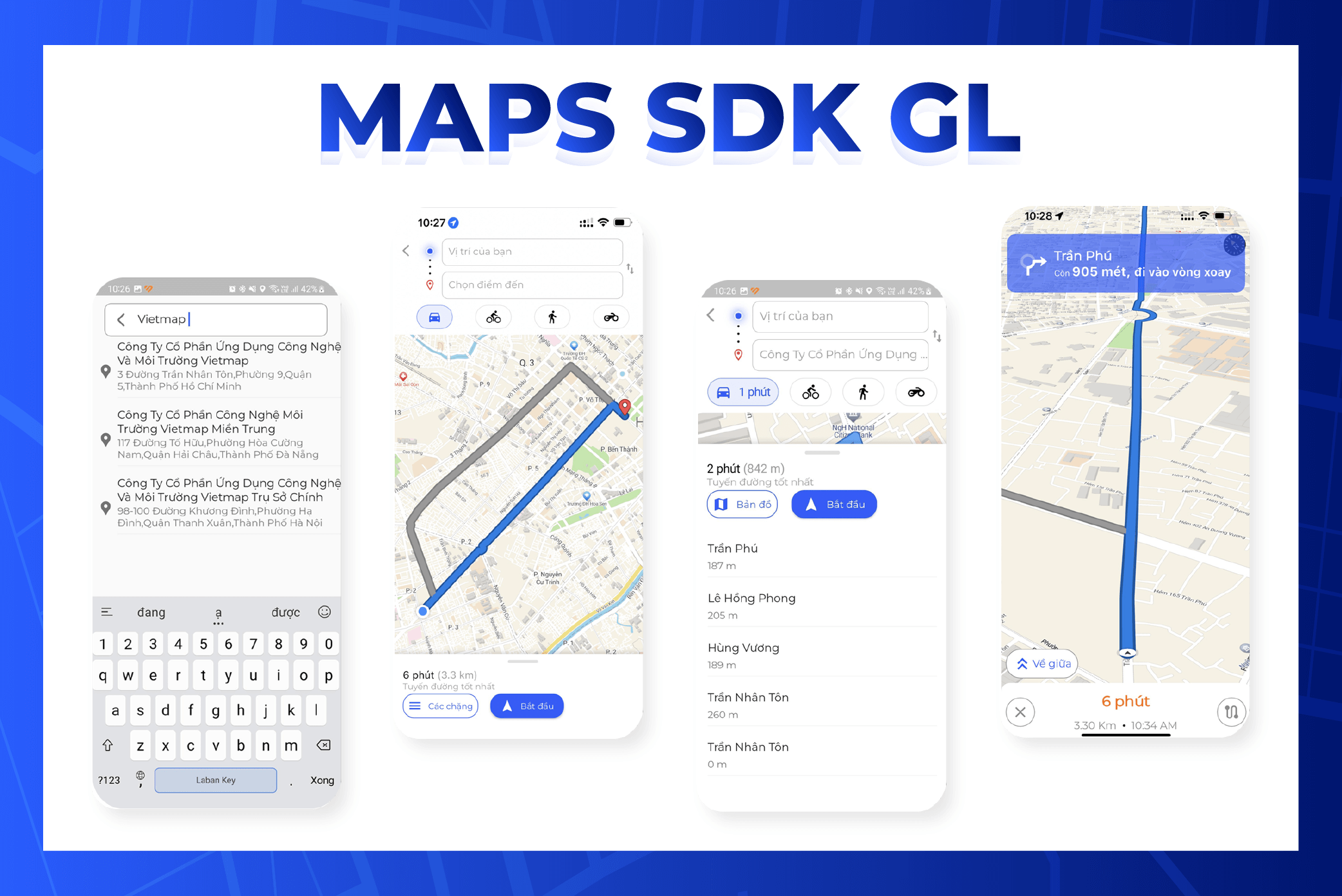
## Environment settings
Install Homebrew
Check brew
```
$ brew --version
```
If Homebrew is not installed, you will see:
```
$ zsh: command not found: brew
```
If Homebrew is not installed, use the following command:
```
$ /bin/bash -c "$(curl -fsSL https://raw.githubusercontent.com/Homebrew/install/HEAD/install.sh)"
```
Install pods
```
$ brew install cocoapods
```
## Create Navigation project with xcode
Create project with Swift and Storyboard Open xcode, select File > New > Project
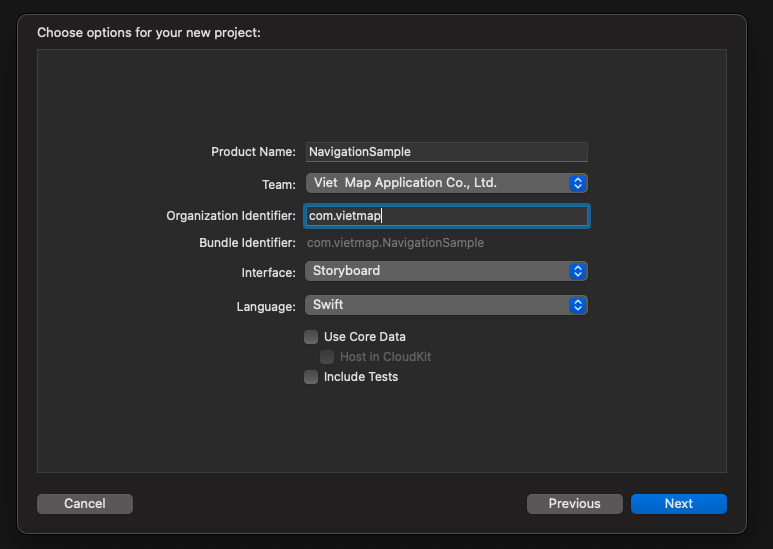
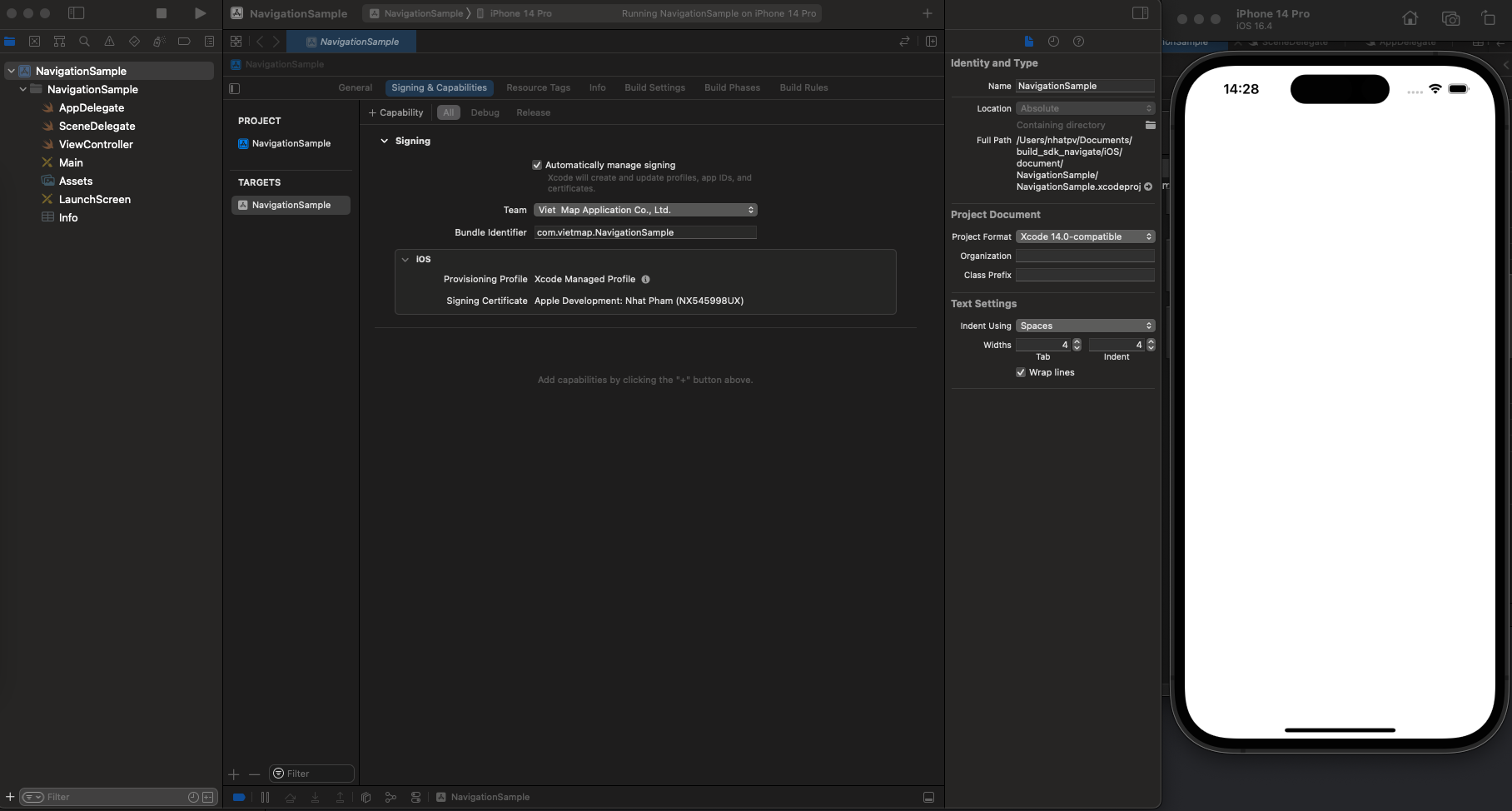
Make sure the project runs successfully. If successful, you will receive the layout as shown below.
**Import libraries with Podfile**
1. Go to Terminal and switch to your local project:
```
cd NavigationSample
```
2. Once you are inside the project folder, type the command below to create/initialize your POD files:
```
pod init
```
3. Open the Podfile and write with code below:
```
pod 'VietMap', '~> 1.2.2'
pod 'VietMapNavigation', '~> 2.1.8'
pod 'VietMapCoreNavigation', '~> 2.1.6'
```
4. Then install library
```
pod install --repo-update
```
5. Double click on the Xcode workspace to open the project
## Events
**addGestureRecognizer**: Register Gesture Recognizer for mapview
**Directions**: Request api to search for directions
**NavigationViewController**: Start navigation
Subscribe to the route manager's event listener
**routeControllerProgressDidChange**
**routeControllerDidReroute**
Register to listen to events of the NavigationMapViewDelegate map manager
**didSelect**: WayPoint
**didSelect**: Route
Register to listen to the navigation manager's NavigationViewControllerDelegate event
**didArriveAt**
**byCanceling**
## Build project
Add config to Info.plist
Request permission to access device location.
```plist
NSLocationAlwaysAndWhenInUseUsageDescription
Your request location description
NSLocationAlwaysUsageDescription
Your request location description
NSLocationWhenInUseUsageDescription
Your request location description
UIBackgroundModes
audio
location
```
Add config URL Style, URL server and API_KEY.
```plist
VietMapURL
https://maps.vietmap.vn/api/maps/light/styles.json?apikey=YOUR_API_KEY_HERE
VietMapAPIBaseURL
https://maps.vietmap.vn/api/navigations/route/
VietMapAccessToken
YOUR_API_KEY_HERE
```
To use your own colors and icons, create a map in [Map Editor](https://tools.vietmap.vn/map-editor/) and replace the style URL above with its style link.
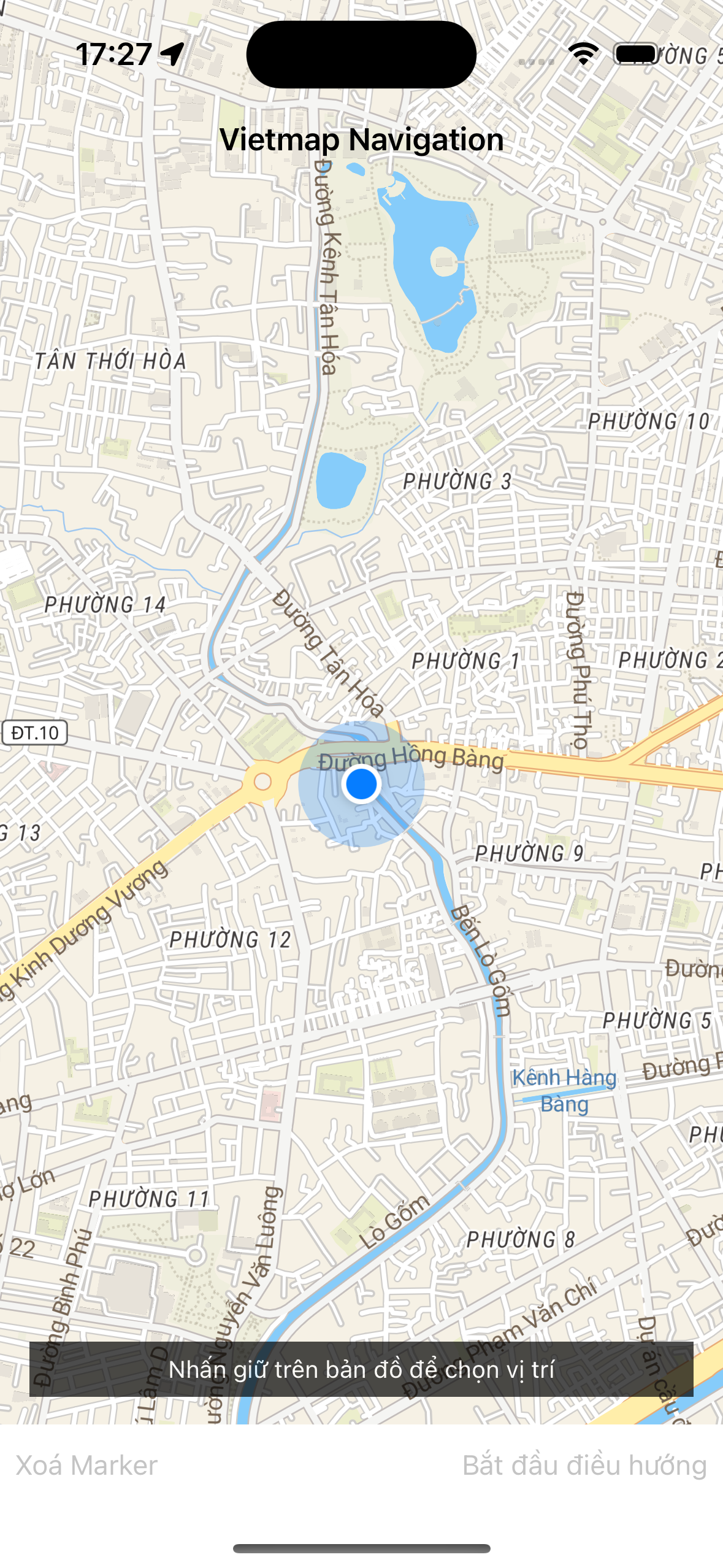
Create a layout in Main like the image below, in which:
UIView: mapView > show mapView
UIButton: clearMarker > delete destination marker
UIButton: startButton > start navigation
Refer to UI or copy paste at NavigationSample/Main.storyboard
### Initialize mapView
```swift
var mapView: NavigationMapView? {
didSet {
oldValue?.removeFromSuperview()
if let mapView = mapView {
configureMapView(mapView)
view.insertSubview(mapView, belowSubview: longPressHintView)
}
}
}
override func viewWillAppear(_ animated: Bool) {
super.viewWillAppear(animated)
startMapView()
}
func startMapView() {
self.routes = nil
self.waypoints = []
self.mapView = NavigationMapView(frame: view.bounds,styleURL: URL(string: styleView))
// Reset the navigation styling to the defaults if we are returning from a presentation.
if (presentedViewController != nil) {
DayStyle().apply()
}
Locale.localeVoice = "vi"
}
```
### Register Gesture Recognizer for mapView
Create a didLongPress event to request a destination in the map.
```swift
let longTap = UILongPressGestureRecognizer(target: self, action: #selector(didLongPress(tap:)))
mapView.gestureRecognizers?.filter({ $0 is UILongPressGestureRecognizer }).forEach(longTap.require(toFail:))
mapView.addGestureRecognizer(longTap)
```
Get the coordinates and assign a marker to the destination in the didLongPress event.
```swift
@objc func didLongPress(tap: UILongPressGestureRecognizer) {
guard let mapView = mapView, tap.state == .began else { return }
if let annotation = mapView.annotations?.last, waypoints.count > 2 {
mapView.removeAnnotation(annotation)
}
if waypoints.count > 1 {
waypoints = Array(waypoints.suffix(1))
}
let coordinates = mapView.convert(tap.location(in: mapView), toCoordinateFrom: mapView)
// Note: The destination name can be modified. The value is used in the top banner when arriving at a destination.
let waypoint = Waypoint(coordinate: coordinates, name: "Dropped Pin #\(waypoints.endIndex + 1)")
waypoints.append(waypoint)
requestRoute()
}
```
### Request API to search for directions
Request to search for a route with the starting point being the current location, the destination being the location after longPress.
```swift
func requestRoute() {
guard waypoints.count > 0 else { return }
guard let mapView = mapView else { return }
let userWaypoint = Waypoint(location: mapView.userLocation!.location!, heading: mapView.userLocation?.heading, name: "User location")
waypoints.insert(userWaypoint, at: 0)
let routeOptions = NavigationRouteOptions(waypoints: waypoints)
requestRoute(with: routeOptions, success: defaultSuccess, failure: defaultFailure)
}
fileprivate func requestRoute(with options: RouteOptions, success: @escaping RouteRequestSuccess, failure: RouteRequestFailure?) {
let handler: Directions.RouteCompletionHandler = {(waypoints, potentialRoutes, potentialError) in
if let error = potentialError, let fail = failure { return fail(error) }
guard let routes = potentialRoutes else { return }
return success(routes)
}
Directions.shared.calculate(options, completionHandler: handler)
}
```
### Start navigating
Start navigation, hide the current mapView and replace it with a navigationView.
```swift
func startStyledNavigation() {
guard let route = self.routes?.first else { return }
navigationViewController = NavigationViewController(
for: route,
styles: [NightStyle()],
locationManager: NavigationLocationManager()
)
navigationViewController.delegate = self
customStyleMap()
configureMapView()
addListenerMap()
present(navigationViewController, animated: true) {
self.mapView?.removeFromSuperview()
self.mapView = nil
}
}
```
### Register to listen to the ProgressDidChange event and the ReRoute event
```swift
private func addListenerMap() {
NotificationCenter.default.addObserver(self, selector: #selector(progressDidChange(_ :)), name: .routeControllerProgressDidChange, object: nil)
NotificationCenter.default.addObserver(self, selector: #selector(progressDidReroute(_ :)), name: .routeControllerDidReroute, object: nil)
}
```
`progressDidChange` returns route and location data during movement, used for camera changes and better navigation.
The example below saves the current position and adds a direction arrow for the next turn.
```swift
@objc func progressDidChange(_ notification: NSNotification ) {
let routeProgress = notification.userInfo![RouteControllerNotificationUserInfoKey.routeProgressKey] as! RouteProgress
let location = notification.userInfo![RouteControllerNotificationUserInfoKey.locationKey] as! CLLocation
currentLocation = location
setCenterIsFirst(location)
addManeuverArrow(routeProgress)
}
```
`progressDidReroute` returns new route data when the user's location is different from the original route.
```swift
@objc func progressDidReroute(_ notification: Notification) {
if let userInfo = notification.object as? RouteController {
navigationViewController.mapView?.showRoutes([userInfo.routeProgress.route])
centerMap(userInfo.locationManager.location!)
}
}
```
### Subscribe to didSelect waypoint and route events
```swift
extension ViewController: NavigationMapViewDelegate {
func navigationMapView(_ mapView: NavigationMapView, didSelect waypoint: Waypoint) {
guard let routeOptions = routes?.first?.routeOptions else { return }
let modifiedOptions = routeOptions.without(waypoint: waypoint)
presentWaypointRemovalActionSheet { _ in
self.requestRoute(with:modifiedOptions, success: self.defaultSuccess, failure: self.defaultFailure)
}
}
func navigationMapView(_ mapView: NavigationMapView, didSelect route: Route) {
guard let routes = routes else { return }
guard let index = routes.firstIndex(where: { $0 == route }) else { return }
self.routes!.remove(at: index)
self.routes!.insert(route, at: 0)
}
private func presentWaypointRemovalActionSheet(completionHandler approve: @escaping ((UIAlertAction) -> Void)) {
let title = NSLocalizedString("Remove Waypoint?", comment: "Waypoint Removal Action Sheet Title")
let message = NSLocalizedString("Would you like to remove this waypoint?", comment: "Waypoint Removal Action Sheet Message")
let removeTitle = NSLocalizedString("Remove Waypoint", comment: "Waypoint Removal Action Item Title")
let cancelTitle = NSLocalizedString("Cancel", comment: "Waypoint Removal Action Sheet Cancel Item Title")
let actionSheet = UIAlertController(title: title, message: message, preferredStyle: .actionSheet)
let remove = UIAlertAction(title: removeTitle, style: .destructive, handler: approve)
let cancel = UIAlertAction(title: cancelTitle, style: .cancel, handler: nil)
[remove, cancel].forEach(actionSheet.addAction(_:))
self.present(actionSheet, animated: true, completion: nil)
}
}
```
### Subscribe to the didArriveAt event and the byCanceling event
`didArriveAt` event is emitted when the user reaches the destination, byCanceling is the event emitted when the user cancels navigation.
```swift
extension ViewController: NavigationViewControllerDelegate {
// By default, when the user arrives at a waypoint, the next leg starts immediately.
// If you implement this method, return true to preserve this behavior.
// Return false to remain on the current leg, for example to allow the user to provide input.
// If you return false, you must manually advance to the next leg. See the example above in `confirmationControllerDidConfirm(_:)`.
public func navigationViewController(_ navigationViewController: NavigationViewController, didArriveAt waypoint: Waypoint) -> Bool {
cancelListener()
return true
}
// Called when the user hits the exit button.
// If implemented, you are responsible for also dismissing the UI.
public func navigationViewControllerDidDismiss(_ navigationViewController: NavigationViewController, byCanceling canceled: Bool) {
cancelListener()
self.navigationViewController.dismiss(animated: true) {
self.startMapView()
}
}
}
```
### SampleCode
```swift
import UIKit
import VietMapCoreNavigation
import VietMapNavigation
import VietMapDirections
import UserNotifications
private typealias RouteRequestSuccess = (([Route]) -> Void)
private typealias RouteRequestFailure = ((NSError) -> Void)
class ViewController: UIViewController, MGLMapViewDelegate {
// MARK: - IBOutlets
@IBOutlet weak var longPressHintView: UIView!
@IBOutlet weak var startButton: UIButton!
@IBOutlet weak var bottomBar: UIView!
@IBOutlet weak var bottomBarBackground: UIView!
@IBOutlet weak var clearMarker: UIButton!
var navigationViewController: NavigationViewController!
var mapboxRouteController: RouteController?
var currentLocation: CLLocation!
var isFirstRender: Bool = false
var styleView = Bundle.main.object(forInfoDictionaryKey: "VietMapURL") as! String
// MARK: Properties
var mapView: NavigationMapView? {
didSet {
oldValue?.removeFromSuperview()
if let mapView = mapView {
configureMapView(mapView)
view.insertSubview(mapView, belowSubview: longPressHintView)
}
}
}
var waypoints: [Waypoint] = [] {
didSet {
waypoints.forEach {
$0.coordinateAccuracy = -1
}
}
}
var routes: [Route]? {
didSet {
startButton.isEnabled = (routes?.count ?? 0 > 0)
guard let routes = routes,
let current = routes.first else { mapView?.removeRoutes(); return }
mapView?.showRoutes(routes)
mapView?.showWaypoints(current)
}
}
// MARK: Directions Request Handlers
fileprivate lazy var defaultSuccess: RouteRequestSuccess = { [weak self] (routes) in
guard let current = routes.first else { return }
self?.clearMarker.isEnabled = true
self?.mapView?.removeWaypoints()
self?.routes = routes
self?.waypoints = current.routeOptions.waypoints
self?.longPressHintView.isHidden = true
}
fileprivate lazy var defaultFailure: RouteRequestFailure = { [weak self] (error) in
self?.routes = nil //clear routes from the map
print(error.localizedDescription)
}
override func viewWillAppear(_ animated: Bool) {
super.viewWillAppear(animated)
startMapView()
}
override func viewDidLoad() {
super.viewDidLoad()
if #available(iOS 10.0, *) {
UNUserNotificationCenter.current().requestAuthorization(options: [.badge, .alert, .sound]) { _,_ in
DispatchQueue.main.async {
CLLocationManager().requestWhenInUseAuthorization()
}
}
}
}
func startMapView() {
self.routes = nil
self.waypoints = []
self.mapView = NavigationMapView(frame: view.bounds,styleURL: URL(string: styleView))
// Reset the navigation styling to the defaults if we are returning from a presentation.
if (presentedViewController != nil) {
DayStyle().apply()
}
Locale.localeVoice = "vi"
}
func configureMapView(_ mapView: NavigationMapView) {
mapView.autoresizingMask = [.flexibleWidth, .flexibleHeight]
mapView.delegate = self
mapView.navigationMapDelegate = self
mapView.routeLineColor = UIColor.yellow
mapView.userTrackingMode = .follow
mapView.showsUserHeadingIndicator = true
let singleTap = UILongPressGestureRecognizer(target: self, action: #selector(didLongPress(tap:)))
mapView.gestureRecognizers?.filter({ $0 is UILongPressGestureRecognizer }).forEach(singleTap.require(toFail:))
mapView.addGestureRecognizer(singleTap)
}
// MARK: Gesture Recognizer Handlers
@objc func didLongPress(tap: UILongPressGestureRecognizer) {
guard let mapView = mapView, tap.state == .began else { return }
if let annotation = mapView.annotations?.last, waypoints.count > 2 {
mapView.removeAnnotation(annotation)
}
if waypoints.count > 1 {
waypoints = Array(waypoints.suffix(1))
}
let coordinates = mapView.convert(tap.location(in: mapView), toCoordinateFrom: mapView)
// Note: The destination name can be modified. The value is used in the top banner when arriving at a destination.
let waypoint = Waypoint(coordinate: coordinates, name: "Dropped Pin #\(waypoints.endIndex + 1)")
waypoints.append(waypoint)
requestRoute()
}
@IBAction func startButtonPressed(_ sender: Any) {
startStyledNavigation()
}
@IBAction func clearMarker(_ sender: Any) {
self.clearMarker.isEnabled = false
self.startButton.isEnabled = false
mapView?.removeRoutes()
mapView?.removeWaypoints()
waypoints.removeAll()
longPressHintView.isHidden = false
}
// MARK: - Public Methods
// MARK: Route Requests
func requestRoute() {
guard waypoints.count > 0 else { return }
guard let mapView = mapView else { return }
let userWaypoint = Waypoint(location: mapView.userLocation!.location!, heading: mapView.userLocation?.heading, name: "User location")
waypoints.insert(userWaypoint, at: 0)
let routeOptions = NavigationRouteOptions(waypoints: waypoints)
requestRoute(with: routeOptions, success: defaultSuccess, failure: defaultFailure)
}
fileprivate func requestRoute(with options: RouteOptions, success: @escaping RouteRequestSuccess, failure: RouteRequestFailure?) {
let handler: Directions.RouteCompletionHandler = {(waypoints, potentialRoutes, potentialError) in
if let error = potentialError, let fail = failure { return fail(error) }
guard let routes = potentialRoutes else { return }
return success(routes)
}
Directions.shared.calculate(options, completionHandler: handler)
}
func startStyledNavigation() {
guard let route = self.routes?.first else { return }
navigationViewController = NavigationViewController(
for: route,
styles: [NightStyle()],
locationManager: NavigationLocationManager()
)
navigationViewController.delegate = self
customStyleMap()
configureMapView()
addListenerMap()
present(navigationViewController, animated: true) {
self.mapView?.removeFromSuperview()
self.mapView = nil
}
}
private func customStyleMap() {
navigationViewController.mapView?.styleURL = URL(string: styleView);
navigationViewController.mapView?.routeLineColor = UIColor.yellow
navigationViewController.mapView?.userTrackingMode = .follow
navigationViewController.mapView?.showsUserHeadingIndicator = true
}
private func configureMapView() {
navigationViewController.mapView?.autoresizingMask = [.flexibleWidth, .flexibleHeight]
navigationViewController.routeController.reroutesProactively = true
}
@objc func progressDidReroute(_ notification: Notification) {
if let userInfo = notification.object as? RouteController {
navigationViewController.mapView?.showRoutes([userInfo.routeProgress.route])
}
}
@objc func progressDidChange(_ notification: NSNotification ) {
let routeProgress = notification.userInfo![RouteControllerNotificationUserInfoKey.routeProgressKey] as! RouteProgress
let location = notification.userInfo![RouteControllerNotificationUserInfoKey.locationKey] as! CLLocation
currentLocation = location
setCenterIsFirst(location)
addManeuverArrow(routeProgress)
}
private func setCenterIsFirst(_ location: CLLocation) {
if !isFirstRender {
DispatchQueue.main.asyncAfter(deadline: .now() + 1.0) {
let camera = MGLMapCamera(
lookingAtCenter: location.coordinate,
acrossDistance: 500,
pitch: 75,
heading: location.course
)
self.navigationViewController.mapView?.setCamera(camera, animated: true)
}
isFirstRender = true
}
}
private func addManeuverArrow(_ routeProgress: RouteProgress) {
if routeProgress.currentLegProgress.followOnStep != nil {
navigationViewController.mapView?.addArrow(route: routeProgress.route, legIndex: routeProgress.legIndex, stepIndex: routeProgress.currentLegProgress.stepIndex + 1)
} else {
navigationViewController.mapView?.removeArrow()
}
}
private func addListenerMap() {
NotificationCenter.default.addObserver(self, selector: #selector(progressDidChange(_ :)), name: .routeControllerProgressDidChange, object: nil)
NotificationCenter.default.addObserver(self, selector: #selector(progressDidReroute(_ :)), name: .routeControllerDidReroute, object: nil)
}
public func cancelListener() {
NotificationCenter.default.removeObserver(self, name: .routeControllerDidReroute, object: nil)
NotificationCenter.default.removeObserver(self, name: .routeControllerProgressDidChange, object: nil)
}
}
// MARK: - NavigationMapViewDelegate
extension ViewController: NavigationMapViewDelegate {
func navigationMapView(_ mapView: NavigationMapView, didSelect waypoint: Waypoint) {
guard let routeOptions = routes?.first?.routeOptions else { return }
let modifiedOptions = routeOptions.without(waypoint: waypoint)
presentWaypointRemovalActionSheet { _ in
self.requestRoute(with:modifiedOptions, success: self.defaultSuccess, failure: self.defaultFailure)
}
}
func navigationMapView(_ mapView: NavigationMapView, didSelect route: Route) {
guard let routes = routes else { return }
guard let index = routes.firstIndex(where: { $0 == route }) else { return }
self.routes!.remove(at: index)
self.routes!.insert(route, at: 0)
}
private func presentWaypointRemovalActionSheet(completionHandler approve: @escaping ((UIAlertAction) -> Void)) {
let title = NSLocalizedString("Remove Waypoint?", comment: "Waypoint Removal Action Sheet Title")
let message = NSLocalizedString("Would you like to remove this waypoint?", comment: "Waypoint Removal Action Sheet Message")
let removeTitle = NSLocalizedString("Remove Waypoint", comment: "Waypoint Removal Action Item Title")
let cancelTitle = NSLocalizedString("Cancel", comment: "Waypoint Removal Action Sheet Cancel Item Title")
let actionSheet = UIAlertController(title: title, message: message, preferredStyle: .actionSheet)
let remove = UIAlertAction(title: removeTitle, style: .destructive, handler: approve)
let cancel = UIAlertAction(title: cancelTitle, style: .cancel, handler: nil)
[remove, cancel].forEach(actionSheet.addAction(_:))
self.present(actionSheet, animated: true, completion: nil)
}
}
// MARK: - NavigationViewControllerDelegate
extension ViewController: NavigationViewControllerDelegate {
// By default, when the user arrives at a waypoint, the next leg starts immediately.
// If you implement this method, return true to preserve this behavior.
// Return false to remain on the current leg, for example to allow the user to provide input.
// If you return false, you must manually advance to the next leg. See the example above in `confirmationControllerDidConfirm(_:)`.
public func navigationViewController(_ navigationViewController: NavigationViewController, didArriveAt waypoint: Waypoint) -> Bool {
cancelListener()
return true
}
// Called when the user hits the exit button.
// If implemented, you are responsible for also dismissing the UI.
public func navigationViewControllerDidDismiss(_ navigationViewController: NavigationViewController, byCanceling canceled: Bool) {
cancelListener()
self.navigationViewController.dismiss(animated: true) {
self.startMapView()
}
}
}
```