Source: https://maps.vietmap.vn/docs/vi/sdk-mobile/sdk-ios/navigation/
# SDK dẫn đường iOS (phiên bản 2.0)
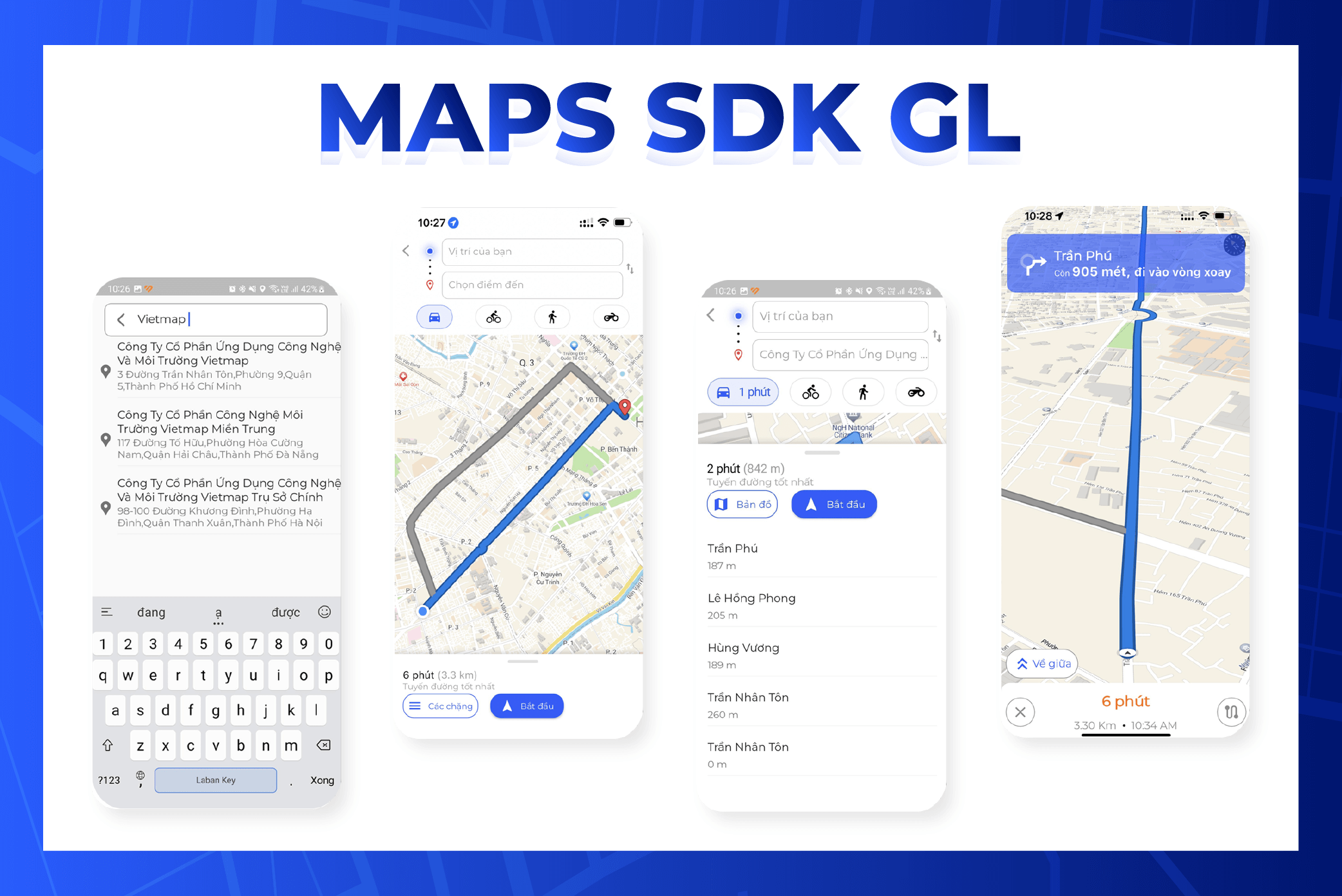
## Chuẩn bị môi trường
Cài Homebrew
Kiểm tra brew
```
$ brew --version
```
Nếu chưa cài Homebrew, bạn sẽ thấy:
```
$ zsh: command not found: brew
```
Chưa cài Homebrew thì cài bằng lệnh:
```
$ /bin/bash -c "$(curl -fsSL https://raw.githubusercontent.com/Homebrew/install/HEAD/install.sh)"
```
Cài CocoaPods
```
$ brew install cocoapods
```
## Tạo dự án dẫn đường bằng Xcode
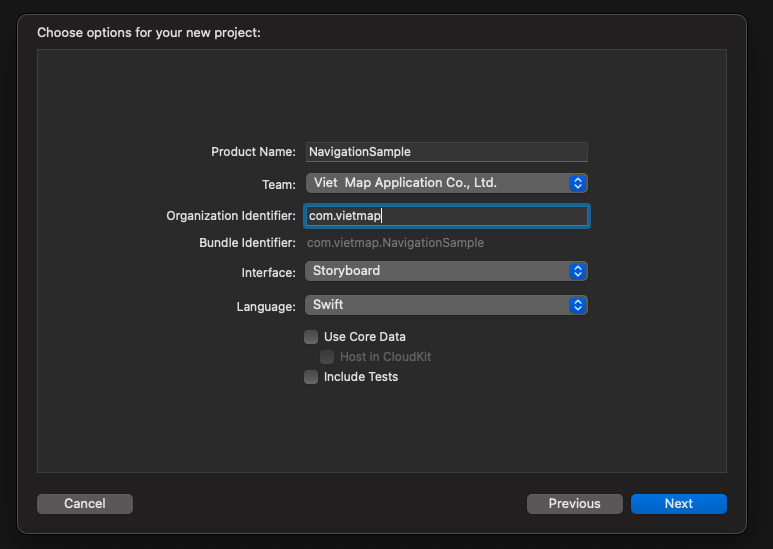
Tạo dự án dùng Swift và Storyboard: mở Xcode, chọn File > New > Project
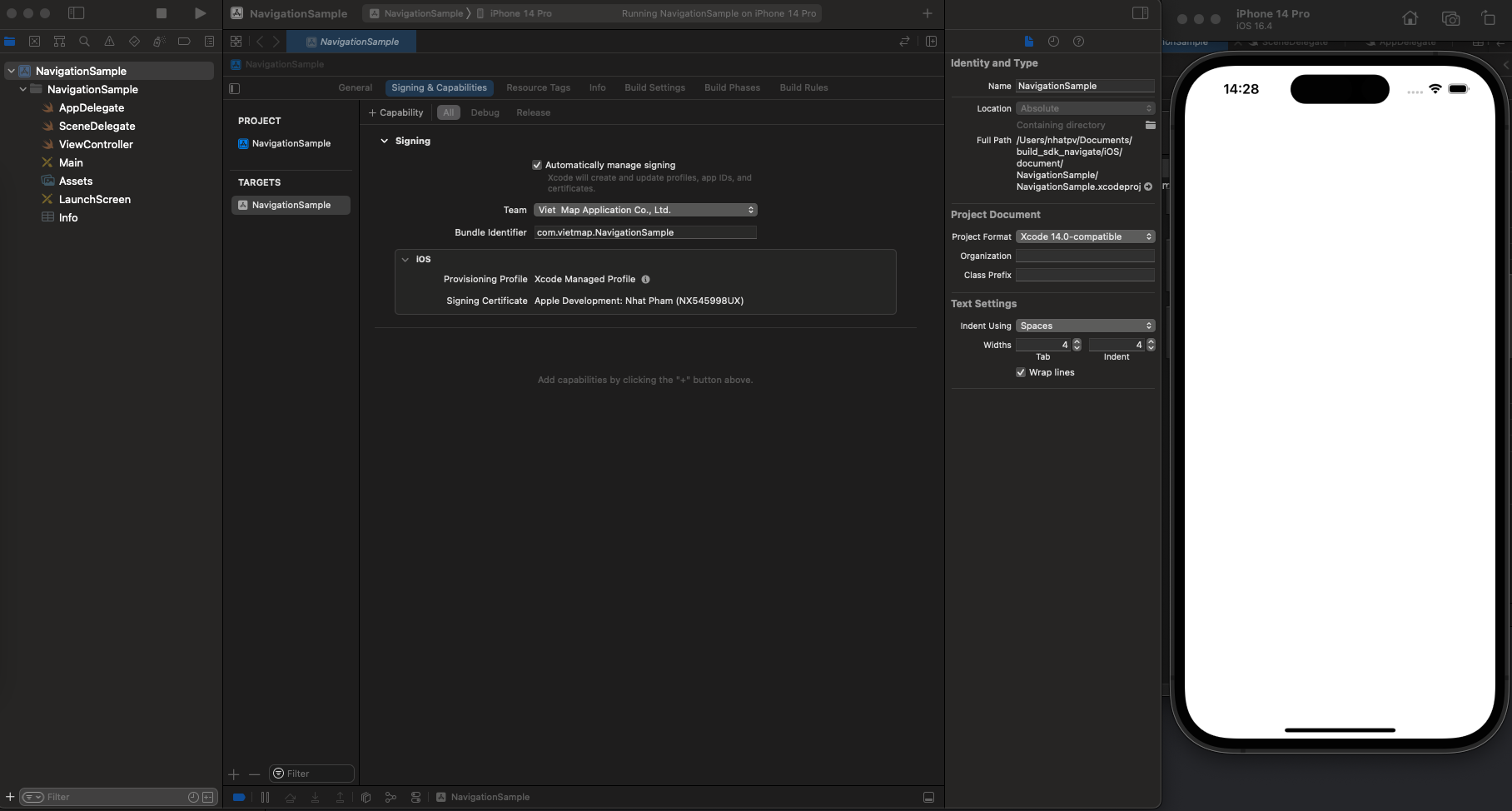
Chạy thử dự án. Nếu chạy được, bạn sẽ thấy giao diện như hình dưới.
**Thêm thư viện bằng Podfile**
1. Mở Terminal và chuyển vào thư mục dự án:
```
cd NavigationSample
```
2. Trong thư mục dự án, chạy lệnh sau để tạo Podfile:
```
pod init
```
3. Mở Podfile và thêm nội dung sau:
```
pod 'VietMap', '~> 1.2.2'
pod 'VietMapNavigation', '~> 2.1.8'
pod 'VietMapCoreNavigation', '~> 2.1.6'
```
4. Cài thư viện
```
pod install --repo-update
```
5. Mở dự án bằng file `.xcworkspace` (bấm đúp)
## Sự kiện
**addGestureRecognizer**: đăng ký nhận cử chỉ trên mapView
**Directions**: gọi API tìm đường
**NavigationViewController**: bắt đầu dẫn đường
Lắng nghe sự kiện của bộ quản lý tuyến đường (route controller)
**routeControllerProgressDidChange**
**routeControllerDidReroute**
Lắng nghe sự kiện bản đồ qua `NavigationMapViewDelegate`
**didSelect**: điểm dừng (waypoint)
**didSelect**: tuyến đường
Lắng nghe sự kiện dẫn đường qua `NavigationViewControllerDelegate`
**didArriveAt**
**byCanceling**
## Build dự án
Thêm cấu hình vào `Info.plist`
Xin quyền truy cập vị trí thiết bị.
```plist
NSLocationAlwaysAndWhenInUseUsageDescription
Your request location description
NSLocationAlwaysUsageDescription
Your request location description
NSLocationWhenInUseUsageDescription
Your request location description
UIBackgroundModes
audio
location
```
Thêm URL style, URL server và API key.
```plist
VietMapURL
https://maps.vietmap.vn/api/maps/light/styles.json?apikey=YOUR_API_KEY_HERE
VietMapAPIBaseURL
https://maps.vietmap.vn/api/navigations/route/
VietMapAccessToken
YOUR_API_KEY_HERE
```
Muốn dùng màu và icon riêng, tạo bản đồ trong [Map Editor](https://tools.vietmap.vn/map-editor/) rồi thay URL style ở trên bằng link style của bản đồ đó.
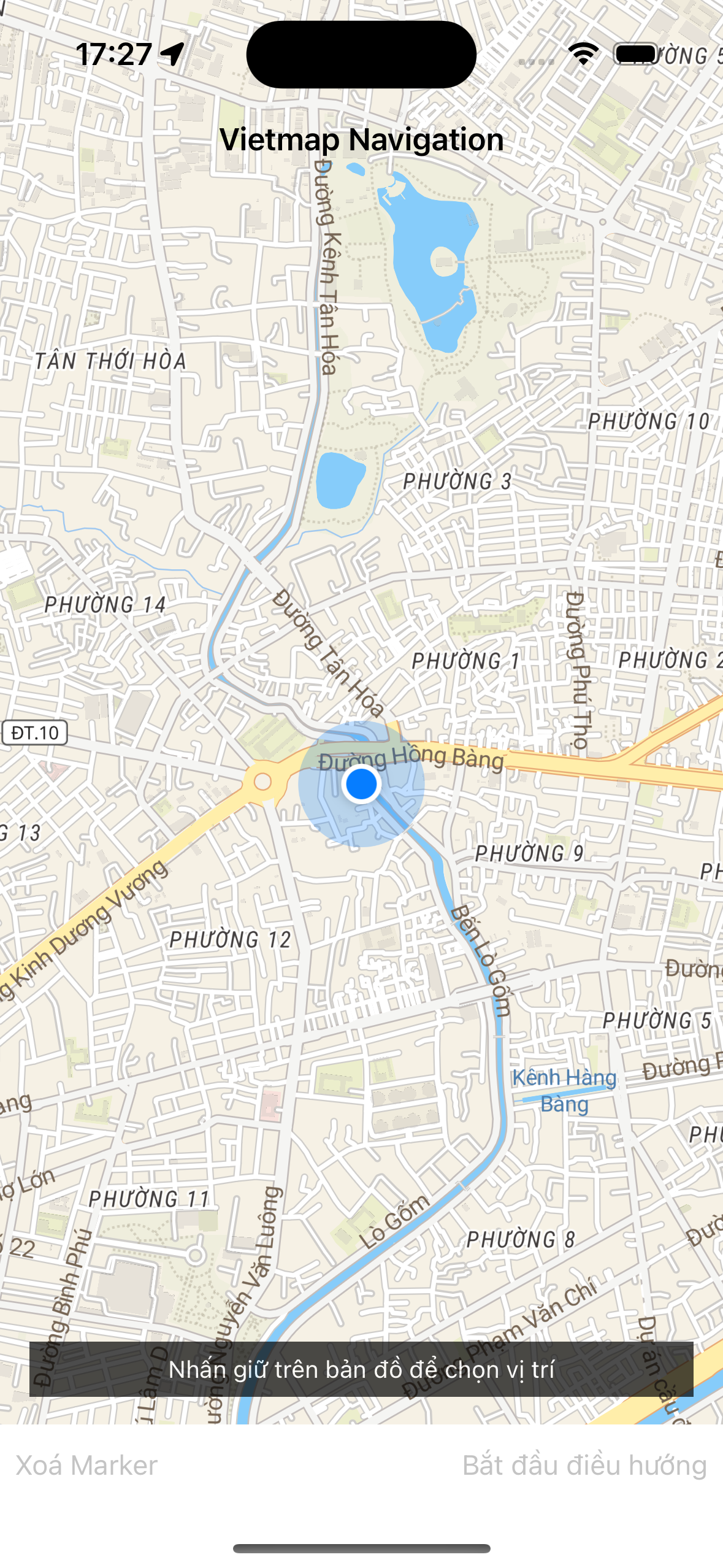
Tạo giao diện trong `Main.storyboard` như hình dưới, gồm:
UIView: `mapView`, hiển thị bản đồ
UIButton: `clearMarker`, xoá marker điểm đến
UIButton: `startButton`, bắt đầu dẫn đường
Có thể xem hoặc chép giao diện từ `NavigationSample/Main.storyboard`
### Khởi tạo mapView
```swift
var mapView: NavigationMapView? {
didSet {
oldValue?.removeFromSuperview()
if let mapView = mapView {
configureMapView(mapView)
view.insertSubview(mapView, belowSubview: longPressHintView)
}
}
}
override func viewWillAppear(_ animated: Bool) {
super.viewWillAppear(animated)
startMapView()
}
func startMapView() {
self.routes = nil
self.waypoints = []
self.mapView = NavigationMapView(frame: view.bounds,styleURL: URL(string: styleView))
// Reset the navigation styling to the defaults if we are returning from a presentation.
if (presentedViewController != nil) {
DayStyle().apply()
}
Locale.localeVoice = "vi"
}
```
### Đăng ký cử chỉ cho mapView
Tạo sự kiện `didLongPress` để người dùng nhấn giữ chọn điểm đến trên bản đồ.
```swift
let longTap = UILongPressGestureRecognizer(target: self, action: #selector(didLongPress(tap:)))
mapView.gestureRecognizers?.filter({ $0 is UILongPressGestureRecognizer }).forEach(longTap.require(toFail:))
mapView.addGestureRecognizer(longTap)
```
Trong `didLongPress`, lấy toạ độ và đặt marker tại điểm đến.
```swift
@objc func didLongPress(tap: UILongPressGestureRecognizer) {
guard let mapView = mapView, tap.state == .began else { return }
if let annotation = mapView.annotations?.last, waypoints.count > 2 {
mapView.removeAnnotation(annotation)
}
if waypoints.count > 1 {
waypoints = Array(waypoints.suffix(1))
}
let coordinates = mapView.convert(tap.location(in: mapView), toCoordinateFrom: mapView)
// Note: The destination name can be modified. The value is used in the top banner when arriving at a destination.
let waypoint = Waypoint(coordinate: coordinates, name: "Dropped Pin #\(waypoints.endIndex + 1)")
waypoints.append(waypoint)
requestRoute()
}
```
### Gọi API tìm đường
Tìm đường từ vị trí hiện tại tới điểm vừa nhấn giữ.
```swift
func requestRoute() {
guard waypoints.count > 0 else { return }
guard let mapView = mapView else { return }
let userWaypoint = Waypoint(location: mapView.userLocation!.location!, heading: mapView.userLocation?.heading, name: "User location")
waypoints.insert(userWaypoint, at: 0)
let routeOptions = NavigationRouteOptions(waypoints: waypoints)
requestRoute(with: routeOptions, success: defaultSuccess, failure: defaultFailure)
}
fileprivate func requestRoute(with options: RouteOptions, success: @escaping RouteRequestSuccess, failure: RouteRequestFailure?) {
let handler: Directions.RouteCompletionHandler = {(waypoints, potentialRoutes, potentialError) in
if let error = potentialError, let fail = failure { return fail(error) }
guard let routes = potentialRoutes else { return }
return success(routes)
}
Directions.shared.calculate(options, completionHandler: handler)
}
```
### Bắt đầu dẫn đường
Bắt đầu dẫn đường: ẩn mapView hiện tại và thay bằng navigationView.
```swift
func startStyledNavigation() {
guard let route = self.routes?.first else { return }
navigationViewController = NavigationViewController(
for: route,
styles: [NightStyle()],
locationManager: NavigationLocationManager()
)
navigationViewController.delegate = self
customStyleMap()
configureMapView()
addListenerMap()
present(navigationViewController, animated: true) {
self.mapView?.removeFromSuperview()
self.mapView = nil
}
}
```
### Lắng nghe sự kiện ProgressDidChange và ReRoute
```swift
private func addListenerMap() {
NotificationCenter.default.addObserver(self, selector: #selector(progressDidChange(_ :)), name: .routeControllerProgressDidChange, object: nil)
NotificationCenter.default.addObserver(self, selector: #selector(progressDidReroute(_ :)), name: .routeControllerDidReroute, object: nil)
}
```
`progressDidChange` trả về dữ liệu tuyến và vị trí trong lúc di chuyển, dùng để điều khiển camera và hiển thị dẫn đường.
Ví dụ dưới lưu vị trí hiện tại và vẽ mũi tên chỉ hướng cho lần rẽ tiếp theo.
```swift
@objc func progressDidChange(_ notification: NSNotification ) {
let routeProgress = notification.userInfo![RouteControllerNotificationUserInfoKey.routeProgressKey] as! RouteProgress
let location = notification.userInfo![RouteControllerNotificationUserInfoKey.locationKey] as! CLLocation
currentLocation = location
setCenterIsFirst(location)
addManeuverArrow(routeProgress)
}
```
`progressDidReroute` trả về tuyến mới khi người dùng đi lệch khỏi tuyến ban đầu.
```swift
@objc func progressDidReroute(_ notification: Notification) {
if let userInfo = notification.object as? RouteController {
navigationViewController.mapView?.showRoutes([userInfo.routeProgress.route])
centerMap(userInfo.locationManager.location!)
}
}
```
### Lắng nghe sự kiện chọn waypoint và chọn tuyến
```swift
extension ViewController: NavigationMapViewDelegate {
func navigationMapView(_ mapView: NavigationMapView, didSelect waypoint: Waypoint) {
guard let routeOptions = routes?.first?.routeOptions else { return }
let modifiedOptions = routeOptions.without(waypoint: waypoint)
presentWaypointRemovalActionSheet { _ in
self.requestRoute(with:modifiedOptions, success: self.defaultSuccess, failure: self.defaultFailure)
}
}
func navigationMapView(_ mapView: NavigationMapView, didSelect route: Route) {
guard let routes = routes else { return }
guard let index = routes.firstIndex(where: { $0 == route }) else { return }
self.routes!.remove(at: index)
self.routes!.insert(route, at: 0)
}
private func presentWaypointRemovalActionSheet(completionHandler approve: @escaping ((UIAlertAction) -> Void)) {
let title = NSLocalizedString("Remove Waypoint?", comment: "Waypoint Removal Action Sheet Title")
let message = NSLocalizedString("Would you like to remove this waypoint?", comment: "Waypoint Removal Action Sheet Message")
let removeTitle = NSLocalizedString("Remove Waypoint", comment: "Waypoint Removal Action Item Title")
let cancelTitle = NSLocalizedString("Cancel", comment: "Waypoint Removal Action Sheet Cancel Item Title")
let actionSheet = UIAlertController(title: title, message: message, preferredStyle: .actionSheet)
let remove = UIAlertAction(title: removeTitle, style: .destructive, handler: approve)
let cancel = UIAlertAction(title: cancelTitle, style: .cancel, handler: nil)
[remove, cancel].forEach(actionSheet.addAction(_:))
self.present(actionSheet, animated: true, completion: nil)
}
}
```
### Lắng nghe sự kiện didArriveAt và byCanceling
`didArriveAt` phát ra khi người dùng tới điểm đến; `byCanceling` phát ra khi người dùng huỷ dẫn đường.
```swift
extension ViewController: NavigationViewControllerDelegate {
// By default, when the user arrives at a waypoint, the next leg starts immediately.
// If you implement this method, return true to preserve this behavior.
// Return false to remain on the current leg, for example to allow the user to provide input.
// If you return false, you must manually advance to the next leg. See the example above in `confirmationControllerDidConfirm(_:)`.
public func navigationViewController(_ navigationViewController: NavigationViewController, didArriveAt waypoint: Waypoint) -> Bool {
cancelListener()
return true
}
// Called when the user hits the exit button.
// If implemented, you are responsible for also dismissing the UI.
public func navigationViewControllerDidDismiss(_ navigationViewController: NavigationViewController, byCanceling canceled: Bool) {
cancelListener()
self.navigationViewController.dismiss(animated: true) {
self.startMapView()
}
}
}
```
### Code mẫu
```swift
import UIKit
import VietMapCoreNavigation
import VietMapNavigation
import VietMapDirections
import UserNotifications
private typealias RouteRequestSuccess = (([Route]) -> Void)
private typealias RouteRequestFailure = ((NSError) -> Void)
class ViewController: UIViewController, MGLMapViewDelegate {
// MARK: - IBOutlets
@IBOutlet weak var longPressHintView: UIView!
@IBOutlet weak var startButton: UIButton!
@IBOutlet weak var bottomBar: UIView!
@IBOutlet weak var bottomBarBackground: UIView!
@IBOutlet weak var clearMarker: UIButton!
var navigationViewController: NavigationViewController!
var mapboxRouteController: RouteController?
var currentLocation: CLLocation!
var isFirstRender: Bool = false
var styleView = Bundle.main.object(forInfoDictionaryKey: "VietMapURL") as! String
// MARK: Properties
var mapView: NavigationMapView? {
didSet {
oldValue?.removeFromSuperview()
if let mapView = mapView {
configureMapView(mapView)
view.insertSubview(mapView, belowSubview: longPressHintView)
}
}
}
var waypoints: [Waypoint] = [] {
didSet {
waypoints.forEach {
$0.coordinateAccuracy = -1
}
}
}
var routes: [Route]? {
didSet {
startButton.isEnabled = (routes?.count ?? 0 > 0)
guard let routes = routes,
let current = routes.first else { mapView?.removeRoutes(); return }
mapView?.showRoutes(routes)
mapView?.showWaypoints(current)
}
}
// MARK: Directions Request Handlers
fileprivate lazy var defaultSuccess: RouteRequestSuccess = { [weak self] (routes) in
guard let current = routes.first else { return }
self?.clearMarker.isEnabled = true
self?.mapView?.removeWaypoints()
self?.routes = routes
self?.waypoints = current.routeOptions.waypoints
self?.longPressHintView.isHidden = true
}
fileprivate lazy var defaultFailure: RouteRequestFailure = { [weak self] (error) in
self?.routes = nil //clear routes from the map
print(error.localizedDescription)
}
override func viewWillAppear(_ animated: Bool) {
super.viewWillAppear(animated)
startMapView()
}
override func viewDidLoad() {
super.viewDidLoad()
if #available(iOS 10.0, *) {
UNUserNotificationCenter.current().requestAuthorization(options: [.badge, .alert, .sound]) { _,_ in
DispatchQueue.main.async {
CLLocationManager().requestWhenInUseAuthorization()
}
}
}
}
func startMapView() {
self.routes = nil
self.waypoints = []
self.mapView = NavigationMapView(frame: view.bounds,styleURL: URL(string: styleView))
// Reset the navigation styling to the defaults if we are returning from a presentation.
if (presentedViewController != nil) {
DayStyle().apply()
}
Locale.localeVoice = "vi"
}
func configureMapView(_ mapView: NavigationMapView) {
mapView.autoresizingMask = [.flexibleWidth, .flexibleHeight]
mapView.delegate = self
mapView.navigationMapDelegate = self
mapView.routeLineColor = UIColor.yellow
mapView.userTrackingMode = .follow
mapView.showsUserHeadingIndicator = true
let singleTap = UILongPressGestureRecognizer(target: self, action: #selector(didLongPress(tap:)))
mapView.gestureRecognizers?.filter({ $0 is UILongPressGestureRecognizer }).forEach(singleTap.require(toFail:))
mapView.addGestureRecognizer(singleTap)
}
// MARK: Gesture Recognizer Handlers
@objc func didLongPress(tap: UILongPressGestureRecognizer) {
guard let mapView = mapView, tap.state == .began else { return }
if let annotation = mapView.annotations?.last, waypoints.count > 2 {
mapView.removeAnnotation(annotation)
}
if waypoints.count > 1 {
waypoints = Array(waypoints.suffix(1))
}
let coordinates = mapView.convert(tap.location(in: mapView), toCoordinateFrom: mapView)
// Note: The destination name can be modified. The value is used in the top banner when arriving at a destination.
let waypoint = Waypoint(coordinate: coordinates, name: "Dropped Pin #\(waypoints.endIndex + 1)")
waypoints.append(waypoint)
requestRoute()
}
@IBAction func startButtonPressed(_ sender: Any) {
startStyledNavigation()
}
@IBAction func clearMarker(_ sender: Any) {
self.clearMarker.isEnabled = false
self.startButton.isEnabled = false
mapView?.removeRoutes()
mapView?.removeWaypoints()
waypoints.removeAll()
longPressHintView.isHidden = false
}
// MARK: - Public Methods
// MARK: Route Requests
func requestRoute() {
guard waypoints.count > 0 else { return }
guard let mapView = mapView else { return }
let userWaypoint = Waypoint(location: mapView.userLocation!.location!, heading: mapView.userLocation?.heading, name: "User location")
waypoints.insert(userWaypoint, at: 0)
let routeOptions = NavigationRouteOptions(waypoints: waypoints)
requestRoute(with: routeOptions, success: defaultSuccess, failure: defaultFailure)
}
fileprivate func requestRoute(with options: RouteOptions, success: @escaping RouteRequestSuccess, failure: RouteRequestFailure?) {
let handler: Directions.RouteCompletionHandler = {(waypoints, potentialRoutes, potentialError) in
if let error = potentialError, let fail = failure { return fail(error) }
guard let routes = potentialRoutes else { return }
return success(routes)
}
Directions.shared.calculate(options, completionHandler: handler)
}
func startStyledNavigation() {
guard let route = self.routes?.first else { return }
navigationViewController = NavigationViewController(
for: route,
styles: [NightStyle()],
locationManager: NavigationLocationManager()
)
navigationViewController.delegate = self
customStyleMap()
configureMapView()
addListenerMap()
present(navigationViewController, animated: true) {
self.mapView?.removeFromSuperview()
self.mapView = nil
}
}
private func customStyleMap() {
navigationViewController.mapView?.styleURL = URL(string: styleView);
navigationViewController.mapView?.routeLineColor = UIColor.yellow
navigationViewController.mapView?.userTrackingMode = .follow
navigationViewController.mapView?.showsUserHeadingIndicator = true
}
private func configureMapView() {
navigationViewController.mapView?.autoresizingMask = [.flexibleWidth, .flexibleHeight]
navigationViewController.routeController.reroutesProactively = true
}
@objc func progressDidReroute(_ notification: Notification) {
if let userInfo = notification.object as? RouteController {
navigationViewController.mapView?.showRoutes([userInfo.routeProgress.route])
}
}
@objc func progressDidChange(_ notification: NSNotification ) {
let routeProgress = notification.userInfo![RouteControllerNotificationUserInfoKey.routeProgressKey] as! RouteProgress
let location = notification.userInfo![RouteControllerNotificationUserInfoKey.locationKey] as! CLLocation
currentLocation = location
setCenterIsFirst(location)
addManeuverArrow(routeProgress)
}
private func setCenterIsFirst(_ location: CLLocation) {
if !isFirstRender {
DispatchQueue.main.asyncAfter(deadline: .now() + 1.0) {
let camera = MGLMapCamera(
lookingAtCenter: location.coordinate,
acrossDistance: 500,
pitch: 75,
heading: location.course
)
self.navigationViewController.mapView?.setCamera(camera, animated: true)
}
isFirstRender = true
}
}
private func addManeuverArrow(_ routeProgress: RouteProgress) {
if routeProgress.currentLegProgress.followOnStep != nil {
navigationViewController.mapView?.addArrow(route: routeProgress.route, legIndex: routeProgress.legIndex, stepIndex: routeProgress.currentLegProgress.stepIndex + 1)
} else {
navigationViewController.mapView?.removeArrow()
}
}
private func addListenerMap() {
NotificationCenter.default.addObserver(self, selector: #selector(progressDidChange(_ :)), name: .routeControllerProgressDidChange, object: nil)
NotificationCenter.default.addObserver(self, selector: #selector(progressDidReroute(_ :)), name: .routeControllerDidReroute, object: nil)
}
public func cancelListener() {
NotificationCenter.default.removeObserver(self, name: .routeControllerDidReroute, object: nil)
NotificationCenter.default.removeObserver(self, name: .routeControllerProgressDidChange, object: nil)
}
}
// MARK: - NavigationMapViewDelegate
extension ViewController: NavigationMapViewDelegate {
func navigationMapView(_ mapView: NavigationMapView, didSelect waypoint: Waypoint) {
guard let routeOptions = routes?.first?.routeOptions else { return }
let modifiedOptions = routeOptions.without(waypoint: waypoint)
presentWaypointRemovalActionSheet { _ in
self.requestRoute(with:modifiedOptions, success: self.defaultSuccess, failure: self.defaultFailure)
}
}
func navigationMapView(_ mapView: NavigationMapView, didSelect route: Route) {
guard let routes = routes else { return }
guard let index = routes.firstIndex(where: { $0 == route }) else { return }
self.routes!.remove(at: index)
self.routes!.insert(route, at: 0)
}
private func presentWaypointRemovalActionSheet(completionHandler approve: @escaping ((UIAlertAction) -> Void)) {
let title = NSLocalizedString("Remove Waypoint?", comment: "Waypoint Removal Action Sheet Title")
let message = NSLocalizedString("Would you like to remove this waypoint?", comment: "Waypoint Removal Action Sheet Message")
let removeTitle = NSLocalizedString("Remove Waypoint", comment: "Waypoint Removal Action Item Title")
let cancelTitle = NSLocalizedString("Cancel", comment: "Waypoint Removal Action Sheet Cancel Item Title")
let actionSheet = UIAlertController(title: title, message: message, preferredStyle: .actionSheet)
let remove = UIAlertAction(title: removeTitle, style: .destructive, handler: approve)
let cancel = UIAlertAction(title: cancelTitle, style: .cancel, handler: nil)
[remove, cancel].forEach(actionSheet.addAction(_:))
self.present(actionSheet, animated: true, completion: nil)
}
}
// MARK: - NavigationViewControllerDelegate
extension ViewController: NavigationViewControllerDelegate {
// By default, when the user arrives at a waypoint, the next leg starts immediately.
// If you implement this method, return true to preserve this behavior.
// Return false to remain on the current leg, for example to allow the user to provide input.
// If you return false, you must manually advance to the next leg. See the example above in `confirmationControllerDidConfirm(_:)`.
public func navigationViewController(_ navigationViewController: NavigationViewController, didArriveAt waypoint: Waypoint) -> Bool {
cancelListener()
return true
}
// Called when the user hits the exit button.
// If implemented, you are responsible for also dismissing the UI.
public func navigationViewControllerDidDismiss(_ navigationViewController: NavigationViewController, byCanceling canceled: Bool) {
cancelListener()
self.navigationViewController.dismiss(animated: true) {
self.startMapView()
}
}
}
```